
USB-C vs. Lightning vs. Micro-USB: Why Connector Standards Still Matter
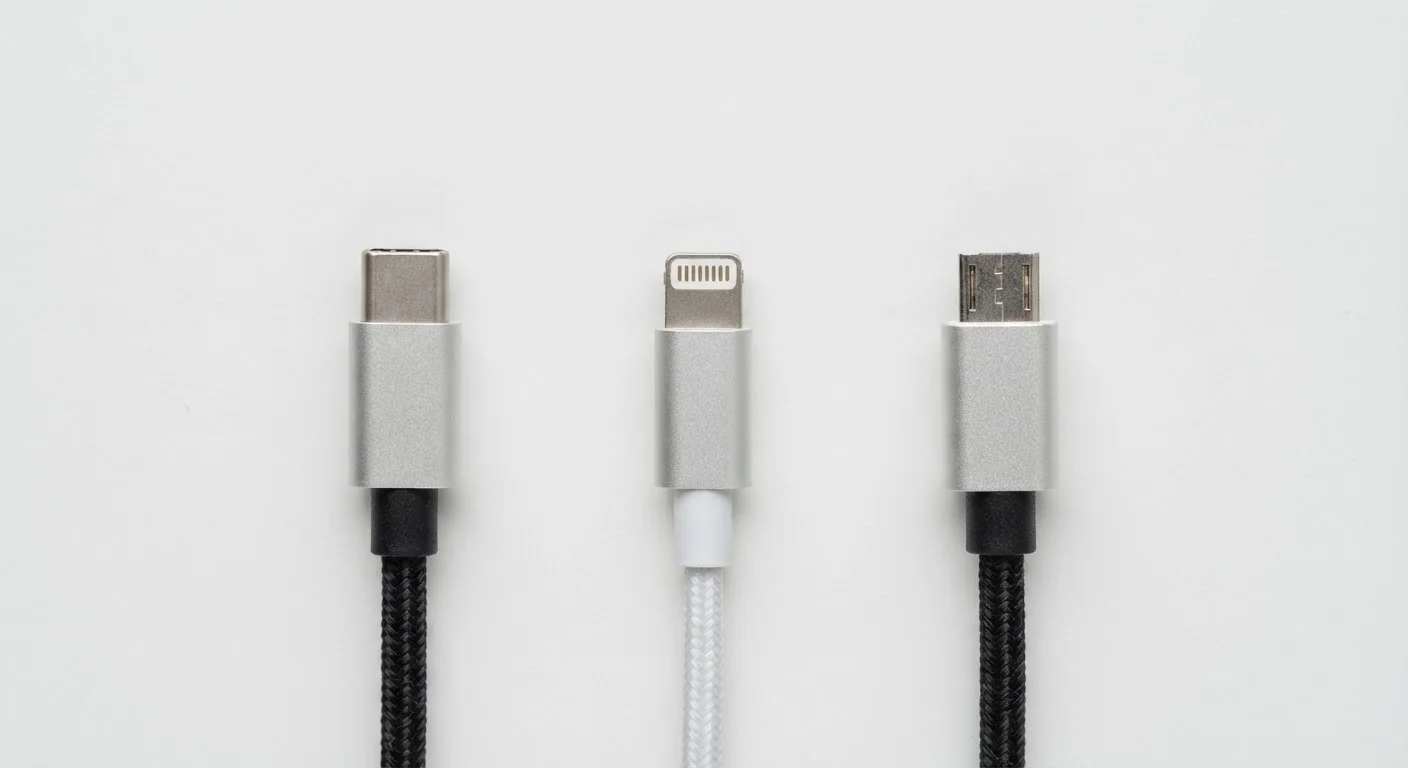
Photo credit: ArticlesHaven.net
In this article
Cable standards affect charging speed, data transfer, and device compatibility. Here's what each connector type actually supports.
Key Takeaways
- USB-C is the current industry standard, supporting fast charging and high-speed data on most modern devices.
- Lightning is Apple's proprietary connector, still found on older iPhones and some accessories, but being phased out.
- Micro-USB is largely legacy hardware, but remains common on budget gadgets and older Android devices.
- The connector type determines maximum charging wattage and data transfer speeds-not just physical fit.
- EU regulations now require USB-C on new smartphones sold in Europe, accelerating the global shift.
Why Connector Standards Actually Matter
It's easy to treat a charging cable as a commodity-something you grab off a gas station rack without thinking. But the connector standard built into your device is one of its less-discussed specs, and it has real consequences for how fast your device charges, how quickly you can move files, and whether one cable can serve multiple gadgets.
The three connectors you're most likely to encounter in everyday life are USB-C, Lightning, and Micro-USB. Each has a distinct history, a specific set of technical capabilities, and a different future ahead of it. Understanding the differences helps you buy smarter-whether you're picking up a new power bank, checking compatibility before a trip, or deciding which devices to prioritize. See our guide to portable chargers vs. charging cases if you're also weighing battery backup options.
| USB-C | Lightning | Micro-USB | |
|---|---|---|---|
| Reversible plug | Yes | Yes | No |
| Max data transfer speed | Up to 40 Gbps (USB4) | USB 2.0 (~480 Mbps) | USB 2.0 (~480 Mbps) |
| Max charging speed | Up to 240W (PD 3.1) | ~20W | Typically 10-18W |
| Video output support | Yes (alt-mode) | No | No |
| Proprietary or open | Open standard | Apple proprietary | Open standard |
| Current adoption trend | Growing - industry default | Declining - phased out | Legacy - minimal new devices |
| Typical device types | Phones, laptops, tablets | Older iPhones, AirPods | Budget gadgets, older Android |
USB-C: The Universal Standard Taking Over
USB-C (formally USB Type-C) is a reversible oval connector that has become the default port on most new Android smartphones, Windows laptops, tablets, and accessories. The connector itself is just the physical interface-what matters is the underlying protocol it carries, which can vary significantly.
At its most capable, USB-C supports USB 3.2 and USB4 data transfer speeds (up to 40 Gbps with USB4/Thunderbolt 4), Power Delivery (PD) charging at up to 240W, and video output via DisplayPort or HDMI alt-mode. However, not every USB-C port does all of this-a budget phone's USB-C port may only support USB 2.0 speeds and basic 18W charging. Always check the device's spec sheet, not just the port shape.
The EU's Common Charger Directive now mandates USB-C on new smartphones sold in Europe, which is accelerating adoption globally. Apple shifted iPhones to USB-C starting with the iPhone 15 lineup.
240W
Max USB-C Power Delivery charging wattage
USB Power Delivery 3.1 specification supports up to 240W, enabling USB-C to charge large laptops and professional devices.
40 Gbps
Peak USB4 / Thunderbolt 4 data speed
USB4 over USB-C can reach 40 Gbps, making it fast enough for high-resolution video editing workflows and external SSDs.
2024
EU USB-C mandate effective date for smartphones
The EU's Common Charger Directive required USB-C on new smartphones sold in EU member states starting in late 2024.
Lightning: Apple's Proprietary Holdout
Apple introduced Lightning in 2012 to replace its older 30-pin connector. It's a compact, reversible connector found on iPhones up through the iPhone 14 series, AirPods, and various Apple accessories. Lightning was a genuine improvement for its time-smaller and more durable than Micro-USB-but it has never supported the higher-end capabilities of USB-C.
Lightning is capped at USB 2.0 data transfer speeds (roughly 480 Mbps), which means transferring large video files from an older iPhone to a computer is noticeably slower than with USB-C devices. Charging is limited to around 20W with a compatible adapter, significantly behind what USB-C PD can achieve.
For existing iPhone users with established accessory ecosystems, Lightning cables and docks continue to function reliably. But Lightning represents a shrinking footprint. If you're deciding between two devices and one uses Lightning, factor in that the accessory ecosystem around it will continue to contract.
Check the Cable, Not Just the Port
A USB-C cable bundled with a budget charger may only support USB 2.0 speeds and slow charging, even though the port looks identical to a premium one. If fast charging or quick file transfers matter to you, look for cables rated for the specific wattage or USB version you need. The spec is usually printed on the packaging or listed in the product description.
Micro-USB: Legacy Hardware That Won't Disappear Overnight
Micro-USB was the dominant smartphone connector for much of the 2010s and remains common on older Android phones, budget earbuds, some e-readers, game controllers, and assorted gadgets. It's a functional connector, but it shows its age in several ways.
Micro-USB is not reversible-you have to orient it correctly to plug it in, which is a small but persistent frustration. Transfer speeds top out at USB 2.0 levels, and charging support is typically limited to older standards like Qualcomm Quick Charge 2.0 or basic 5W/10W speeds. Some Micro-USB cables also have thinner wire gauges that restrict even those modest speeds.
If a device you own uses Micro-USB, it works fine for its intended purpose. But Micro-USB shouldn't be a feature that draws you toward a new purchase-it's a sign a device is using older component designs. Much like choosing between connection types for speed and reliability, connector standards follow a similar logic: the underlying technology determines real-world performance, not just the label.
Not All USB-C Cables Are Equal
A USB-C connector that looks identical on two different cables can deliver vastly different performance. A cable rated for USB 2.0 will bottleneck data transfers even if your device supports faster speeds. Similarly, a cable not rated for high-wattage Power Delivery can be a safety risk if used with a high-wattage charger. Always match your cable's rated wattage and data spec to your actual use case.
Practical Tips for Managing Multiple Connector Types
Many households still have a mix of all three connectors across their devices-an older Kindle on Micro-USB, AirPods on Lightning, and a newer phone on USB-C. A few practical approaches help reduce friction:
- Multi-tip charging cables combine two or three connector heads in one cable, reducing clutter. Quality varies widely, so check user reviews for durability before committing.
- GaN (gallium nitride) chargers with multiple USB-A and USB-C ports can power several devices from one outlet block-useful for travel. Our comparison of battery backup options covers portable power more broadly.
- Adapters (Lightning-to-USB-C, Micro-USB-to-USB-C) are widely available and inexpensive, though they can limit charging speed depending on the adapter's rating.
- When buying any new device, check the spec sheet for both the connector type and the USB version it supports-the port shape alone doesn't tell the full story.
The connector landscape is genuinely consolidating around USB-C, but the transition will take years to fully play out across the full range of consumer devices.

Author
Articles Haven Editorial Contributor
Articles Haven Editorial Team is the collective byline for our editorial team and contributor network. Articles published under this byline or an editorial pen name are researched, written, and reviewed according to our editorial standards for clarity, consistency, and independence before publication.
View all articles →