
Reading the Declarations Page: The One Sheet That Summarizes Your Entire Policy
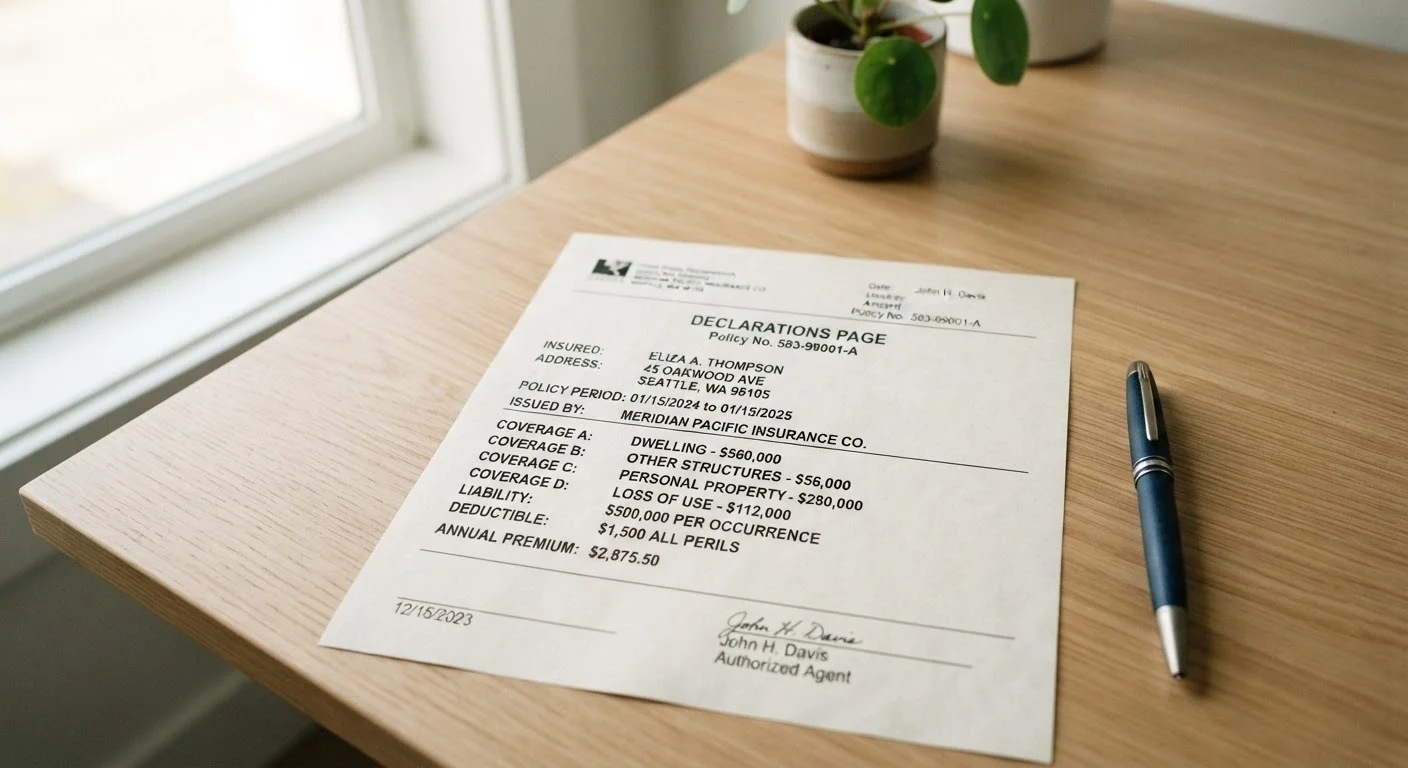
Photo credit: ArticlesHaven.net
In this article
The declarations page is the first page of any policy. Learn what every field on it means and how to spot errors before they cost you.
Key Takeaways
- The declarations page summarizes your entire policy on one or two pages - it is not the full contract.
- Every field on the dec page affects your coverage, cost, or claims eligibility, so errors carry real consequences.
- Common mistakes include wrong named insureds, incorrect address, outdated coverage limits, and missing endorsements.
- Comparing declarations pages side by side is one of the most efficient ways to evaluate two policies.
- Always verify the dec page matches what you agreed to when you applied - discrepancies should be corrected immediately.
What the Declarations Page Actually Is
Think of the declarations page as a policy receipt: it records who is covered, what is covered, for how much, and over what time period. Insurers are required to provide it, and it's often the document most referenced during a claim - by both you and the insurer's adjuster.
What the dec page is not is the complete contract. The full policy document - which may run 20 to 60 pages - contains the definitions, conditions, exclusions, and claims procedures that ultimately determine whether coverage applies in a specific situation. The dec page summarizes the terms; the policy body governs them. That distinction matters when a claim is disputed.
For a practical walkthrough of the full document beyond the dec page, this guide to reading an insurance policy without getting lost covers each section in plain language.
Don't Confuse the Dec Page With the Full Policy
The declarations page is a summary, not the complete contract. Exclusions, conditions, and definitions that govern what is actually covered live in the policy document itself. Always read the full policy before assuming the dec page tells the whole story. See how each section of a policy document works for a deeper breakdown.
What You'll Need Before You Start
What you will need
Current declarations page
The document you'll be reviewing and fact-checking against your original application.
Original policy application or confirmation email
Used to verify the dec page reflects exactly what you agreed to when you enrolled.
Prior year's declarations page
Lets you spot changes to coverage, limits, or premium between renewal periods.
Pen or digital annotation tool
For marking fields that need clarification or appear incorrect.
How to Read Your Declarations Page Step by Step
Work through the dec page field by field using the steps below. This process typically takes 10 to 20 minutes and is worth doing at every renewal - not just when you first buy a policy. Errors introduced at renewal are common and easy to miss if you assume nothing changed.
Locate and identify the declarations page
The declarations page - often called the "dec page" - is typically the first one or two pages of any insurance policy packet. It may also be sent separately at renewal. Look for a header that reads "Policy Declarations," "Insurance Declarations," or simply "Declarations."
If your policy is digital, it's usually a separate PDF attachment labeled accordingly. Do not confuse it with the coverage summary brochure, which is a marketing document, not a contractual one.
Confirm the named insured and address
The top of the dec page identifies the named insured - the person or entity the policy legally covers. Verify that your name is spelled correctly and matches your legal name. Check that every individual who needs coverage is listed where required (for example, all household members on a homeowners policy).
Also confirm the property address or vehicle information. An incorrect address or VIN (Vehicle Identification Number) can void coverage for a claim at that location or on that vehicle.
Check the policy period
The policy period (also called the effective dates) shows the exact start and end dates of your coverage. Confirm these dates align with when you expected coverage to begin. A lapse - even a single day - can leave you uninsured.
If you recently renewed, make sure the new dec page shows the updated period and that there's no gap between the old expiration and the new effective date.
Review coverage types and limits
This section is the core of the dec page. It lists each coverage type included in the policy alongside the coverage limit - the maximum the insurer will pay for a covered loss of that type.
For auto policies, common coverages include liability (bodily injury and property damage), collision, comprehensive, uninsured motorist, and medical payments. For homeowners, look for dwelling, other structures, personal property, loss of use, and liability limits.
Verify that each limit matches what you selected when you applied. A limit that was entered incorrectly could leave a significant gap at claim time.
Review deductibles
The deductible is the amount you pay out of pocket before insurance coverage kicks in. Deductibles are listed per coverage type and sometimes per peril (for example, a separate hurricane or wind deductible on a coastal homeowners policy).
Confirm the deductible amounts match what you agreed to. A higher deductible than you intended means more out-of-pocket cost if you file a claim. If you see an unfamiliar deductible type, look it up in the policy definitions section.
Confirm the premium and payment schedule
The dec page will show the total annual premium and, often, the installment amount if you pay monthly or quarterly. Verify this matches what you were quoted. Discrepancies can result from rating errors or data entered incorrectly during enrollment.
Also look for any discounts applied - multi-policy, safety device, or loyalty discounts should appear. If a discount you were promised is missing, flag it with your insurer.
Check for endorsements and exclusions listed
Endorsements (also called riders or floaters) are modifications that add, remove, or change coverage from the base policy. The dec page typically lists any endorsements attached to your policy by name or form number.
If you added a scheduled jewelry rider, a home business endorsement, or earthquake coverage, confirm it appears here. Missing endorsements mean you're paying for - or relying on - coverage that isn't actually in force.
For a thorough look at how endorsements fit into the broader policy structure, see what to look for before signing an insurance policy.
Errors on the Dec Page Are Not Minor
A wrong address, missing driver, or incorrect coverage limit isn't a clerical footnote - it can affect whether a claim is paid. If you find any discrepancy, contact your insurer or agent in writing as soon as possible and request a corrected declarations page. Keep a copy of all correspondence.
Using the Dec Page to Compare Policies
One underused application of the declarations page is side-by-side policy comparison. Because every insurer follows a similar format, you can align two dec pages and directly compare limits, deductibles, and covered perils without reading two full contracts.
Use the Dec Page as a Comparison Checklist
When shopping for a new policy, request declarations pages from competing insurers and lay them side by side. Look at the same fields - named insured, coverage types, limits, deductibles, and premium - so you're comparing equivalent items. This method is faster and more reliable than reading two full policy documents.
Pay attention to coverage types as well as limits. A lower-premium policy that omits a coverage type entirely isn't a better deal - it's a different product. If you're comparing auto policies, this breakdown of auto insurance declarations pages explains vehicle-specific fields in more detail.
For a broader look at evaluating policies across insurance types, what an insurance declarations page tells you at a glance is a useful companion read. And if you want to understand the full range of insurance categories this kind of review applies to, the insurance types hub is a good starting point.
This article is for general informational and educational purposes only and does not constitute insurance, legal, or financial advice. Coverage terms, limits, and regulations vary by provider, policy, and state. Always read your full policy document and consult a licensed insurance agent or adviser for guidance specific to your situation.

Author
Articles Haven Editorial Contributor
Articles Haven Editorial Team is the collective byline for our editorial team and contributor network. Articles published under this byline or an editorial pen name are researched, written, and reviewed according to our editorial standards for clarity, consistency, and independence before publication.
View all articles →